
Every code change has a blast radius: the features and tests it can break, including the ones you never opened. The hard part is finding it before you commit. Here is a real example from our own repo.
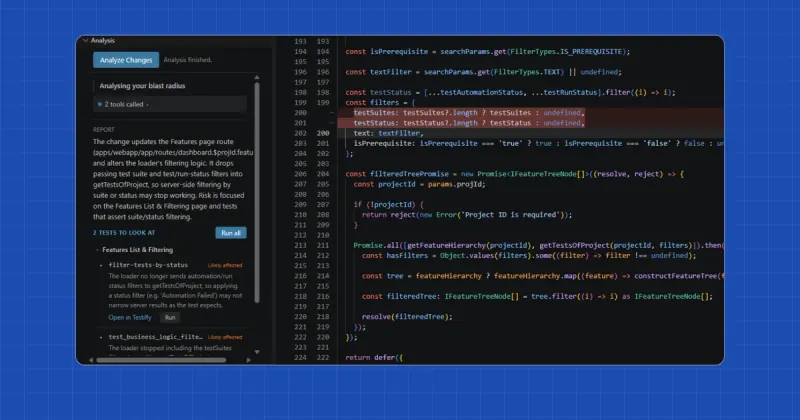
Look at the two red lines in the picture above. They sit in the loader of the Features page, and they pass the suite filter and the status filter to getTestsOfProject. Now they are gone. If you review this diff, nothing in it says “status filter is in danger”. It looks like a tiny cleanup.
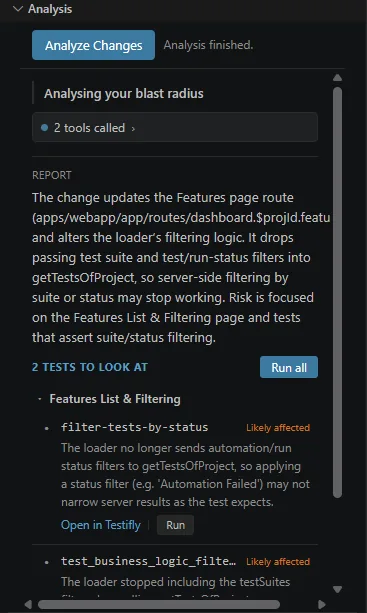
So I opened the Testifly panel in VS Code and clicked Analyze Changes. The Testifly plugin reads your uncommitted changes and shows you the blast radius. For this change, the report said both filters are dropped, so filtering by suite or by status on the server may stop working. It gave me two tests to look at, filter-tests-by-status and test_business_logic_filte.... Both are tagged “Likely affected”, and each has a short reason.
I was not thinking about those tests at all. I touched a loader, and the tests that care about it check a filter on a page. That is the blast radius of a two-line change.
You don’t need to commit first. The plugin reads your working tree, and it works the same if you wrote the change or your AI coding agent did.
What is the blast radius of a code change?
It is the set of features and tests the change can affect, including the ones in files you never opened. Edit a shared form component and every page that renders the form is inside it, not only the page you were working on.
Why is code from an AI coding agent hard to check before a commit?
One prompt can touch a dozen files. Nobody reads all of them line by line, and I don’t think we should pretend we do.
Linters, type checks and code review all read code. None of them opens the page, fills in the form and checks the data was saved. The failures that hurt are the quiet ones, where the page loads and nothing looks broken, so nobody files a bug.
An end-to-end suite would catch these. But a full suite takes long enough that most developers don’t run it before they push. So the check moves to CI, or to staging, or to a customer. That is the part I wanted to fix.
How do you test code your AI coding agent wrote before you commit?
Find the blast radius, then run it. Four steps with Testifly, all in the editor.
- Let your agent code. Claude Code, Cursor, GitHub Copilot, Codex, or any agent that edits files in your checkout.
- Find the blast radius. Click Analyze Changes. The Testifly agent reads the diff, your checkout and your Testifly project, then lists the features and tests the change reaches. Each test comes with a reason and a confidence tag, like “Likely affected”.
- Test the blast radius. Click Run all, or Run on a single test. Tests run in Chromium on your machine.
- Close the loop. Open a failed test to see the failed step and its error. Give that to your agent, then analyze and run again.
The idea is simple. You review a change that was already tested where it matters, and you don’t find out in CI.
Why run only the affected tests?
Because then you actually run them. Waiting for the full suite is the reason people skip it. The analysis ranks the tests the change reaches, so you run those. You pick how many run at once, from 1 to 8, and each one opens its own browser.
Nothing new to write here. It uses the features, tests, environments and test users already saved in your Testifly project.
Can you see why a test was picked?
Yes, and I think this matters more than the list itself. The panel shows every step the analysis took: the files it read, the searches it ran and the Git history it checked. Click a step and you see what was asked and what came back.
Sometimes the agent needs something only you know, for example which of two features a change is meant for. Then it asks you in a card in the panel. Answer, and it continues. You can stop it at any time.
Which IDEs and coding agents does it work with?
| Tool | Supported |
|---|---|
| VS Code | Version 1.86 or later |
| JetBrains IDEs | Version 2025.2 or later: WebStorm, IntelliJ IDEA, PyCharm, PhpStorm and the others |
| Coding agents | Any agent that edits files in your checkout, including Claude Code, Cursor, GitHub Copilot and Codex |
How do you set it up?
Install the plugin, sign in once, pick a project, and answer four prompts on the first run.
- Install. In VS Code, open Extensions, search for Testifly and install Testifly for VS Code. In a JetBrains IDE, open Settings > Plugins > Marketplace, search for Testifly and install it.
- Sign in. Choose Sign In in the Testifly side bar or tool window. Your browser opens the sign-in page and returns you to the editor. You stay signed in after a restart.
- Choose a project. The choice is saved per checkout, so two repositories can use two different Testifly projects.
- Run once. The plugin checks for Node.js and npm. It asks before it downloads the test runner and browser (about 300 MB, once per runner version). Then it asks which environment and which test user to use.
Environments can exist only on your machine, for example Local at http://localhost:3000. The plugin keeps each page path and changes only the address, so a test of /dashboard/reports opens http://localhost:3000/dashboard/reports. After a successful login it caches the session for 15 minutes, and magic-link logins work too.
What leaves your machine?
The plugin sends the list of changed files and the diff, plus the answers to the analysis agent’s tool calls, for example the contents of a file it asked to read. During a run it requests your project’s tests. The agent can read your checkout but it cannot change it.
Sign-in uses OAuth with PKCE. The token and test-user passwords stay in the IDE’s secure store, and tokens, passwords, saved logins and magic links are never written to a log.
What does it not do?
It is not magic, so here are the limits.
Local runs use Chromium only. The first run needs the 300 MB download. You need a Testifly project with generated tests, and a test that cannot run locally is marked skipped, with a reason. Saved logins expire after 15 minutes.
And the analysis depends on what the agent finds in your code. Treat the tag as a guide, not a verdict, and read the reasoning before you trust it.
FAQ
Do I need to commit before I analyze? No. The plugins read the working tree.
Can I test against localhost?
Yes. Add a local environment with the address of your app, such as http://localhost:3000.
Can the analysis change my code? No. It can read your checkout but cannot modify it.
What do I need before I start? A Testifly account and a project with generated tests, a Git repository open in the editor, Node.js and npm, and about 300 MB of free disk space.
What if I use more than one repository? Each checkout keeps its own project, environment and parallel-run settings.
Try it on your own app
Connect your web app and Testifly finds its flows. First results arrive in about 45 minutes. Then install the plugin and run it on your next agent change.
Start your 30-day free trial - 30 tests, 4,500 monthly executions, unlimited users, no card.
Related reading: the IDE plugins documentation, how blast radius and the MCP server fit into your workflow, and Testifly vs AI coding agents.