

Test what your change can break, before you commit
Testifly reads your uncommitted changes, lists the features and tests they can reach, and runs them on your machine from VS Code or JetBrains.
Free for 30 days · No credit card required
Know what a change reaches
A single prompt can touch a dozen files. Testifly works out which features and tests the change reaches, whoever wrote it.
What is blast radius in testing?
Blast radius is the set of features and tests a code change can reach. Testifly reads your uncommitted changes and lists them, each with the reason it was picked.
Why run only these tests?
You run the tests that matter for this change, not the whole suite. They use the features, tests, environments and test users already in your Testifly project.
Find the blast radius
Click Analyze Changes. The Testifly agent reads your diff, then looks through your checkout and your Testifly project.
- Reads your working tree, so nothing has to be committed first
- Lists the features and tests the change reaches, each with a reason
- Shows every step: the files it read, what it searched for and why it picked each test
- Asks you when it needs something only you know, such as which of two features a change is meant for
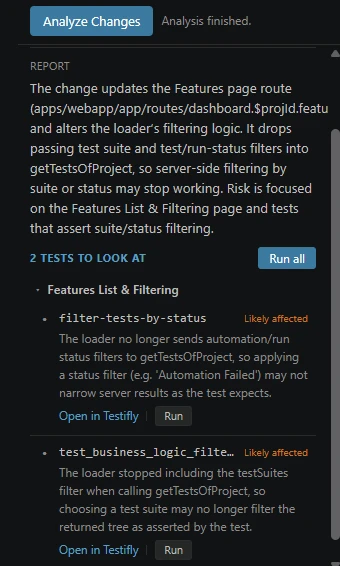
Run them before you commit
Click Run all, or Run on a single test. Tests run in a real Chromium browser on your machine, against your local app or any environment saved in your Testifly project.
Install steps and settings are in the IDE plugin docs.
Local or saved environments
Test http://localhost:3000 or any environment in your project. Page paths stay the same.
Parallel runs
Run 1 to 8 tests at the same time, each in its own browser.
Watch the browser
Turn off headless mode to see a test run.
See the failed step
Open a failed test to see the step and the error, then give it to your coding agent to fix.
What is sent, and where this stops
What is sent to Testifly
- The list of changed files and the diff.
- The contents of a file the agent asks to read, and the results of its searches.
- The agent can read your checkout but cannot change it.
- Sign-in uses OAuth with PKCE. Test-user passwords stay in your IDE's secure store, and saved logins are encrypted with AES-256-GCM.
- Your sign-in token, passwords and saved logins are never written to a log.
Where it stops
- The analysis is an agent's judgment. A change can reach tests it does not list, so use the list as where to look first.
- It needs a Testifly project with generated tests and a Git repository open in your editor.
- Local runs need Node.js and npm, and a one-time download of about 300 MB for the test runner and browser.
- It checks your change before you commit. It does not replace your CI.
Questions about blast radius
Does it work with Claude Code, Cursor or GitHub Copilot?
It works alongside any coding agent that edits files in your checkout, including Claude Code, Cursor, GitHub Copilot and Codex. It reads your working tree, so nothing has to be committed first.
Do my tests have to be in my repository?
No. It uses the features, tests, environments and test users already saved in your Testifly project.
Can I run the tests against localhost?
Yes. Add an environment that exists only on your machine, for example Local at http://localhost:3000. The plugin keeps the path of each page and changes only the address of the app.
Which editors are supported?
Visual Studio Code 1.86 or later, and JetBrains IDEs from version 2025.2, including WebStorm, IntelliJ IDEA, PyCharm and PhpStorm. Install Testifly from the extensions view or the plugin marketplace.
What happens to my code?
Testifly receives the list of changed files, the diff and the file contents the agent asks to read. The agent can read your checkout but cannot change it.