
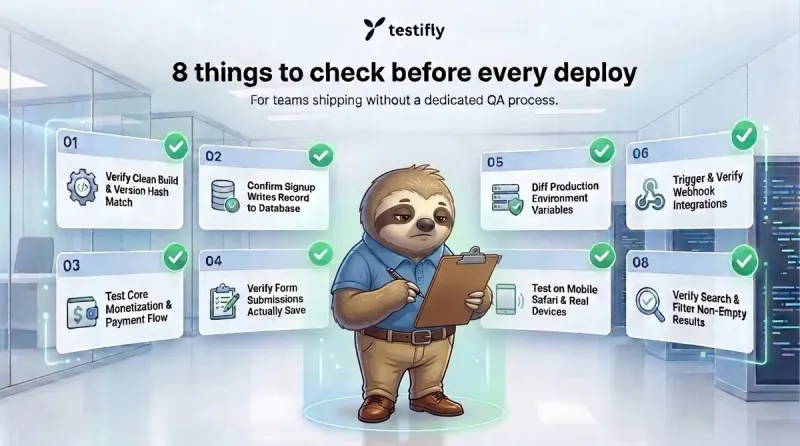
You’re pushing a deploy at nine at night because that’s the first quiet hour you’ve had all day. There’s no QA engineer to hand it to, no test suite to run, and no time to click through the whole web app by hand before you ship. So the check becomes three familiar clicks, if it happens at all. This list covers what actually breaks the other ways: the checks a team with no process tends to skip, because nothing in the interface tells them something’s wrong.
1. The build finished clean, not only fast.
Success in the deploy log doesn’t guarantee a correct release. Partial deploys, stale cached assets, and half-applied database migrations often report success anyway.
2. A signup that succeeds in the UI doesn’t guarantee the account exists.
The form can show a success message even when the record never writes to the database, and that gap is invisible from the outside. It usually shows up later as a support ticket, or as a churn number nobody can explain.
3. The flow that makes the business money is the one where a break costs the most before anyone notices.
Every product has an action that pays the bills: a purchase, an upgrade, a signed contract, whatever yours depends on. A deploy that quietly breaks it costs revenue before it ever shows up as a trend on a dashboard.
4. A form that says “saved” hasn’t necessarily saved anything.
Most broken forms fail politely. The button click succeeds, the page shows a confirmation, and the underlying write never happens.
5. Staging config has a way of riding along into production.
A leftover API key, a test webhook URL, a debug flag nobody remembered to flip back: none of it throws a visible error. These get set once during initial setup and then nobody revisits them, so the first sign of trouble is a downstream failure that looks unrelated to the code you actually deployed.
6. Webhooks and integrations fail without throwing an error on your side.
Payment processors, email providers, and tools like Slack or Jira all depend on a webhook endpoint that a deploy can break with nothing telling you directly: a route that moved, a signature check that started rejecting valid requests. Everything can look fine on your end while nothing arrives on theirs.
7. Desktop Chrome is the easiest browser to pass and the least likely to catch a real problem.
Mobile Safari handles viewports, date pickers, and file uploads differently enough that something can break there while working everywhere else you tested. That gap widens around anything backed by the OS rather than your own CSS, which is exactly where a desktop-only check has nothing to compare against.
8. Search and filters can return zero results by default, and look correct doing it.
An empty results page and a broken one look identical to whoever is watching the deploy go out. A broken index and a genuine empty state produce the exact same blank screen.
The part that actually breaks down
None of these checks take long on their own, and this list isn’t exhaustive; every stack has its own version of one or two more. What breaks down under real time pressure is running through any checklist the same way, every time, without quietly skipping whichever ones feel less urgent that week. A rushed team defaults to the two or three checks that come to mind first, and the rest depend on someone remembering to write them down somewhere they’ll actually look again before the next deploy.
How Testifly can help
Testifly connects to a URL, discovers a web app’s real flows on its own, and runs checks like these on every deploy without anyone writing a test case or remembering to run one. When something breaks, you get notified right away with a root-cause explanation and session video, instead of finding out from a support ticket days later.